
For Azure IP Co-Sell Eligibility
Your reference architecture diagram should clearly show how your solution runs on Azure and consumes Azure services. Microsoft uses this diagram to understand how your IP is deployed and reused—not to judge the quality of your architecture. This guide explains what to include and how to validate your diagram before submission.
What is a reference architecture diagram?
A reference architecture diagram is a visual model of the infrastructure your Marketplace solution relies on.
For Azure IP Co-Sell, Microsoft uses this diagram to confirm that:
Your intellectual property (IP) is deployed on Azure
Your solution drives Azure consumption
Azure services are clearly shown as part of the runtime and data flow
The diagram is not meant to assess how “good” or “optimal” your architecture is. Its purpose is simply to show how your solution uses Microsoft cloud services.
How to create your diagram
You can use any diagramming tool, but Microsoft Visio is recommended because it includes Azure architecture icons and templates that align well with Microsoft’s review process.
Architecture guidelines Microsoft expects
1. Your IP must be clearly identified
Your diagram should clearly identify:
Your solution as a product, application, or service
The repeatable IP code you provide (not customer-specific custom work)
Where and how that IP is deployed on Azure
Microsoft expects your code to be highly reusable and not dependent on extensive customization per deployment.
2. Azure must be the primary execution environment
Your solution should be shown as:
Running on Azure
Driving consumption of Azure services
Azure should be the main runtime environment—not just a connector, installer, or management layer.
3. Clear data and event flow
The diagram must include a high-level data or event flow that explains how components interact.
A reviewer should be able to quickly understand:
Where data enters the system
How it is processed
Where it is stored or delivered
Directional arrows and short labels are strongly recommended.
4. Clear logical boundaries
Your diagram should visually separate:
Azure cloud
Customer cloud or tenant
On-premises environments (if applicable)
Integrations with other cloud services (if applicable)
These boundaries help Microsoft understand ownership, responsibility, and deployment context.
5. Azure services must be explicitly shown
The diagram should clearly show:
Azure services that host your solution
Azure services that interact with or support your solution
Services that consume Azure resources
Examples include compute, data stores, identity, networking, messaging, and monitoring services.
6. User interfaces and exposure points
Include any:
User interfaces
APIs
Integrations
External services
These should show how customers or systems interact with your solution.
Example: what Microsoft looks for
Microsoft provides example diagrams (such as a vertical industry chatbot) to illustrate:
Clear IP identification
Azure-hosted execution
Understandable data flow
Logical environment boundaries
Your diagram doesn’t need to match these examples exactly—but it should be equally clear and readable.
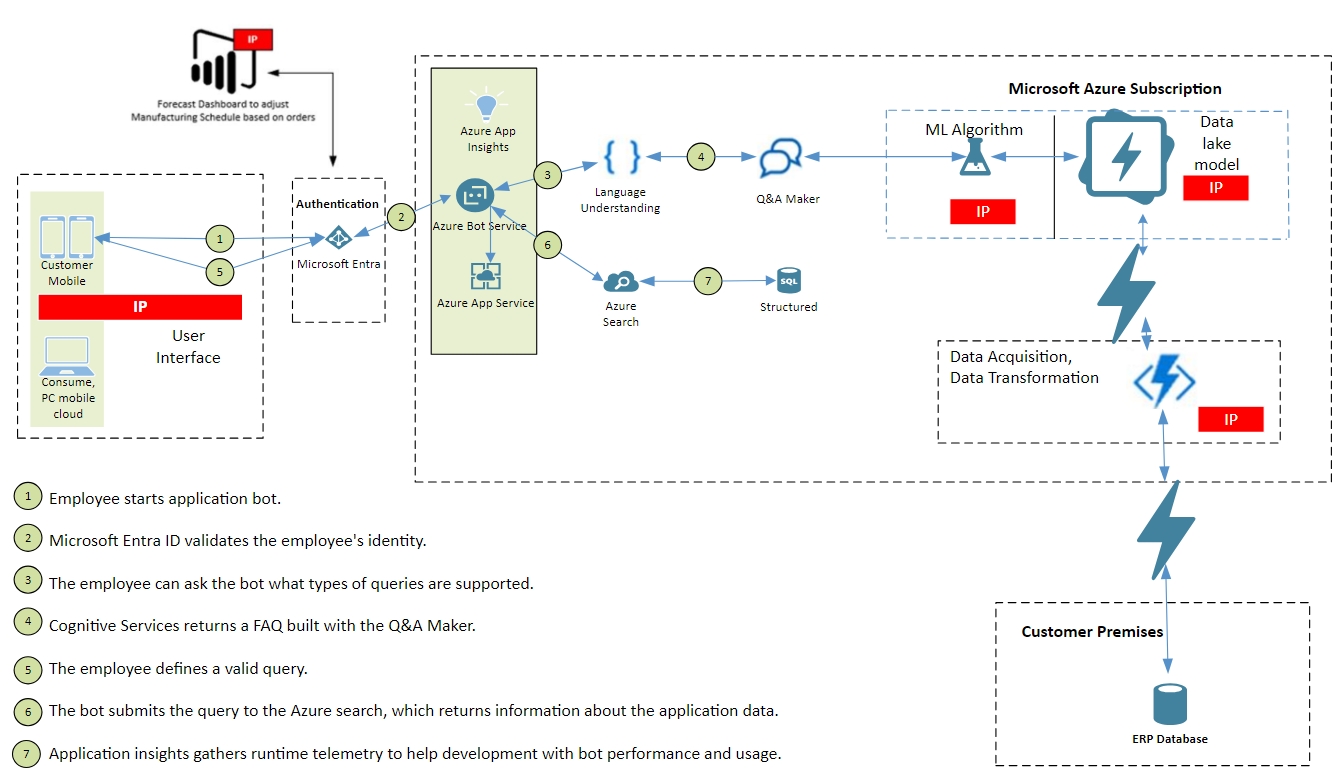
Fig. 1
Verification checklist (use before submission)
Once your diagram is drafted, use this checklist to confirm readiness:
Step 1: IP clarity
The solution’s IP code is clearly labeled
The IP is reusable and not customer-specific
Step 2: Azure as the core runtime
The main workload runs on Azure
Azure services are not just peripheral connectors
Step 3: Data flow visibility
A clear, high-level data or event flow is shown
Component interactions are easy to follow
Step 4: Environment boundaries
Azure, customer, on-prem, and external systems are visually separated
Step 5: Azure service usage
Azure services hosting and supporting the solution are explicitly shown
Azure consumption is evident
Step 6: Exposure and access
User interfaces, APIs, or integrations are included where applicable
If all steps check out, your diagram is well aligned with Azure IP Co-Sell expectations.