
Table Of Contents
- Introduction
- Co-sell Specific Mapping Manager Templates
- Marketplace Specific Mapping Manager Templates
Labra Mapping Templates
Create, customize, and reuse multiple Salesforce mapping templates for Offers, Referrals, and Reseller Auth - saving time, reducing repetition, and speeding up onboarding. Instead of being limited to one template per flow, you can:
- Create multiple templates for different partners, regions, or sales motions
- Customize, clone, and edit templates as needed
- Use pre-filled defaults for onboarding, training, or demos
- For the first time user, a screen like below will be visible, clicking on "Create your First Template" will open a new modal which lets user to create new templates based on Cloud Provider and Feature (Co-sell, Marketplace).
-
For an existing user, Existing mappings are now organized into pre-built templates. These follow a standard naming convention:
-
All the mapping of an existing user will be availble here in the name as mentioned below:
- Format: Preconfigured_[Cloud Provider]_[Product Type]_Template
- Example: Preconfigured_AWS_Referral_Template
-
Template Limits:
- Each user can create and store up to nine (9) templates in total.
- This count includes any preconfigured templates provided by Labra.
-
Preconfigured templates are permanent and cannot be deleted.
- Exceeding the Limit: If you need more than nine templates, please contact Labra Support to request an increase.
-
Cloning Templates: You can create a copy of any template—whether it's a preconfigured one or one you created yourself—using the Clone action. This is ideal for making variations without starting from scratch.
Note: Not to add cloned template name as Preconfigured.
Creating a New Template
Follow these steps to create a custom mapping template.
Note: You can only create templates for the module and cloud that you have purchased.
-
Click the "Create New Template" button.
-
Configure Template Details: A modal window titled "Create a New Template" will appear. Fill in the following required information:
- Enter a unique template name (E.g. WAFR (Labra Referral)): Enter a unique, descriptive name for your template.
- Select a cloud: Select the relevant cloud for which we create deals with (e.g., AWS, Microsoft, GCP).
- Select Account Name (Account ID): Select the associated account from which we will be sharing the deal. (visible only when we have multiple accounts linked in our Org)
- Select Template Type: Choose the type for which template should be created (e.g., Referral, Offer, Reseller Authorization).
- Based on the Cloud, and template choosen this will change:
- Solution offered drop down will apppear - When we choose
- Cloud : AWS
- Template: Referral
- Select a product drop down will apppear - When we choose
- Cloud : AWS/Microsoft/GCP
- Template: Offer
- Select a product drop down will apppear - When we choose
- Cloud : AWS/Microsoft
- Template: Reseller Authorization
- Solution offered drop down will apppear - When we choose
- Save: Click the "Create" button. Your new template will be saved and appear in your templates list.
After Creation: Once the template is created, you can proceed to edit and configure the specific field mappings within it.
- Reset to default: Clicking on this button available at the bottom of the page will remove all the mapped values in the template chosen.
- Discard: Clicking on discard will remove all the changes made by the user and mappings will return to the last Saved state.
- Save: Clicking on Save button will save all the current changes made to the template.
Co-sell Mapping Manager Template:
- For Co-selling, We do support templates for all the clouds like AWS, GCP and Microsoft
Specific to AWS cloud: 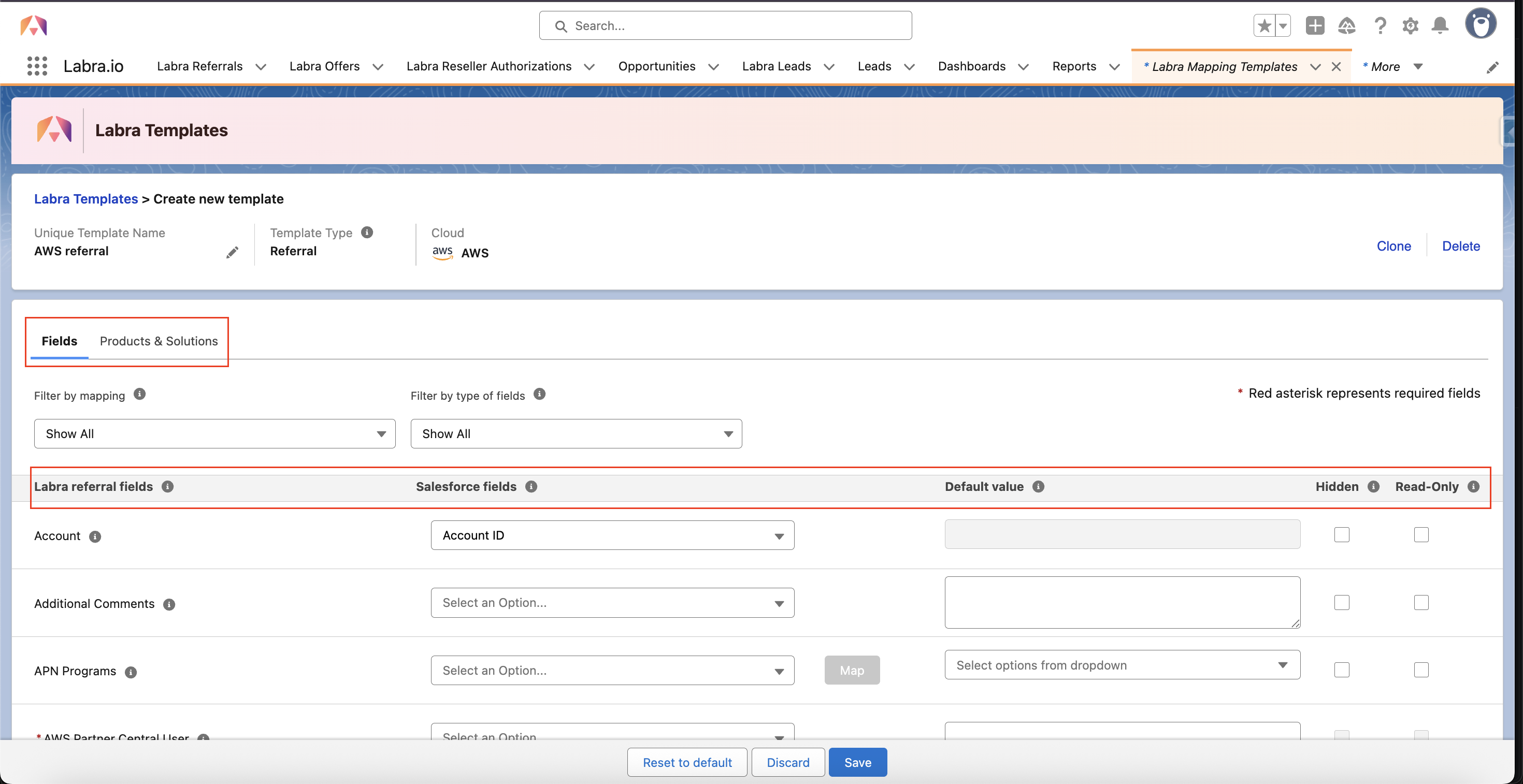
- User have two sections:
- Fields - User can map all the fields of AWS referrals using Salesforce fields or Default values
- A new option of Hidden and Read-only is provided for the non mandatory fields
- user cannot hide or set read-only for mandatory fields
- Products and Solution - User can map their Solutions and products available
- Fields - User can map all the fields of AWS referrals using Salesforce fields or Default values
Specific to Microsoft cloud: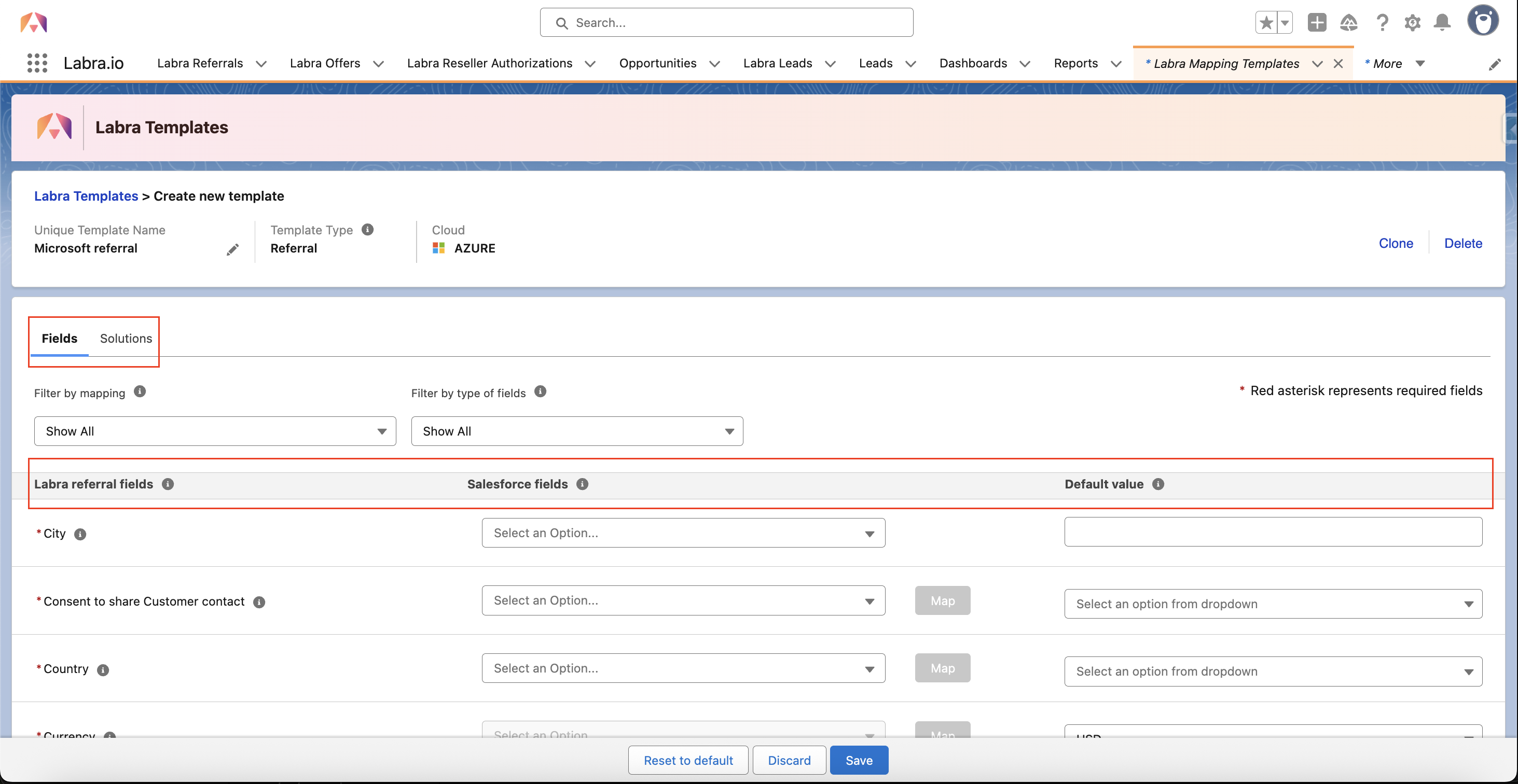
- User have two sections:
- Fields - User can map all the fields of Microsoft referrals using Salesforce fields or Default values
- Solutions - User can map their Solutions available
Specific to GCP cloud: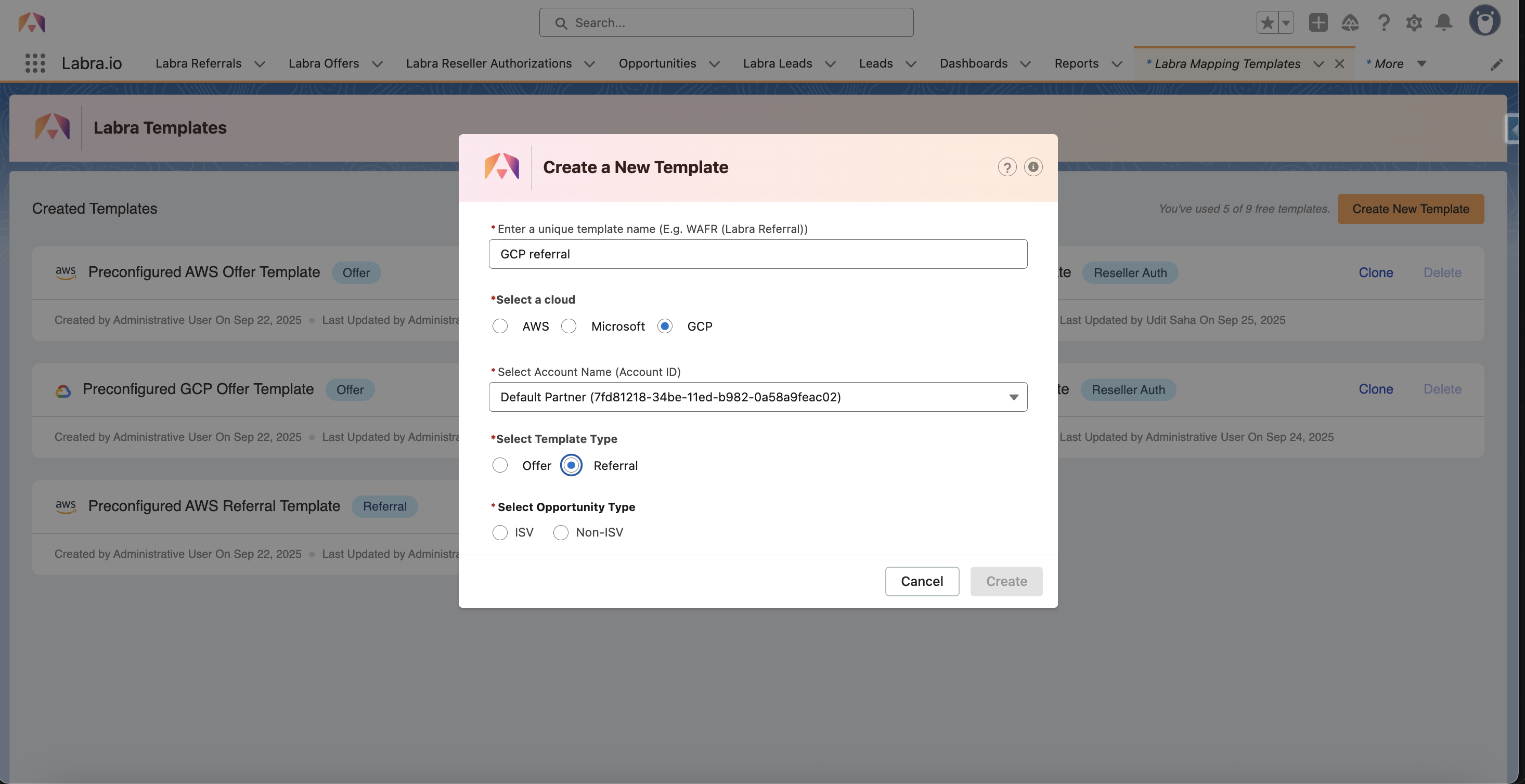
- User can choose ISV or Non-ISV options
- User can map all the fields of GCP referrals using Salesforce fields or Default values
- User can make the non-mandatory fields either Hidden or Read-only
Marketplace Mapping Manager Template:
For Markeplace we have Offers and Reseller Authorizations
For Offers:
Specific to AWS cloud: 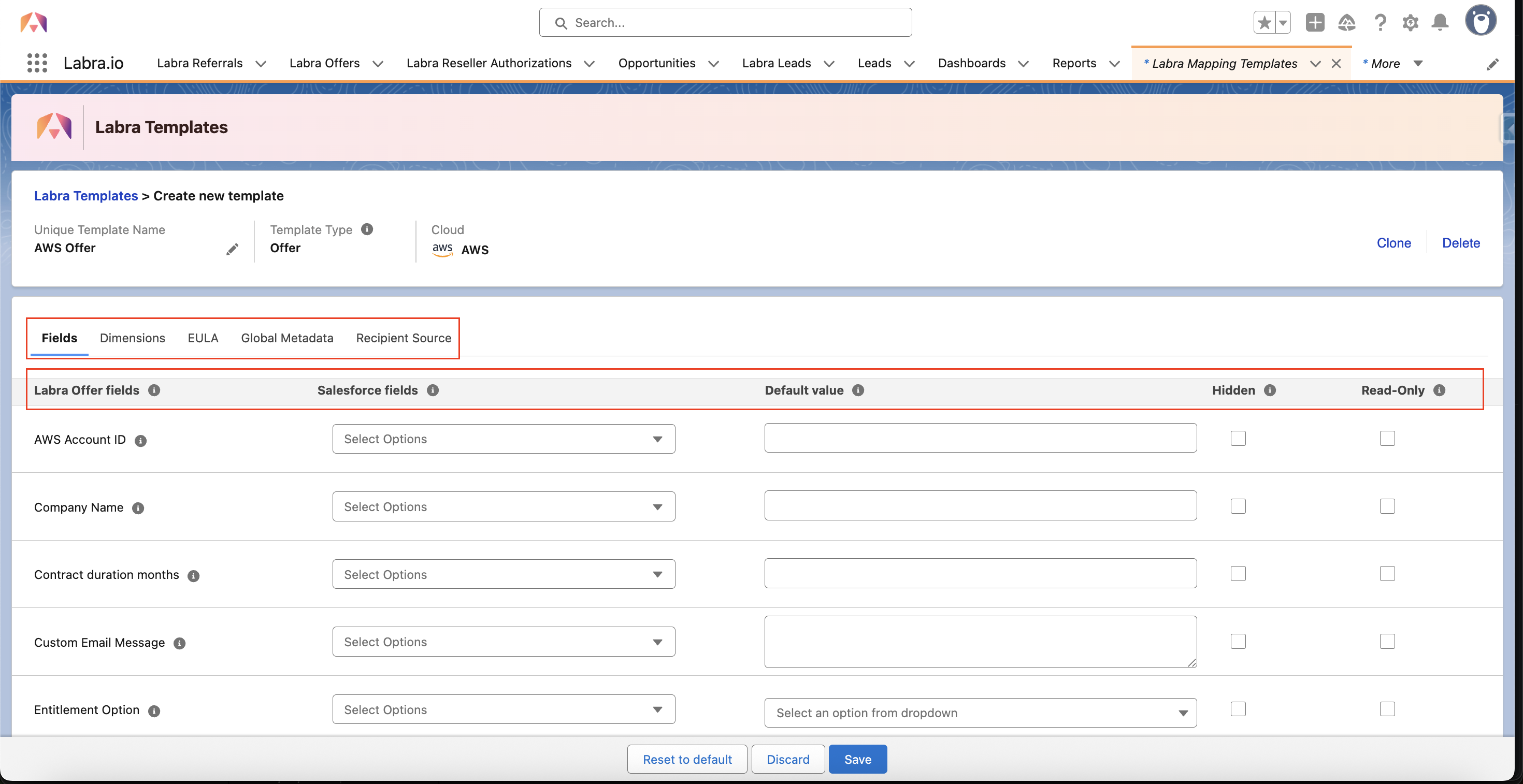
- User have five sections:
-
Fields - User can map all the fields of AWS Offer using Salesforce fields or Default values
- A new option of Hidden and Read-only is provided for all the fields
- User can also hide the sections of Custom metadata, Global Metadata and Stakeholder from the fields sections
- Dimensions - User can map dimensions related data for the products available in the org
-
EULA - End User License Agreement can be filled in three ways
- Default Eula - Added to all the Offers created using this template
- Mapping Based Eula - Added to all the Offer when mapped criteria is met (using this template)
- Both - can have both the above options
-
Global Metadata - Can have Key and value pairs to be added specific to the offer with value having different data types:
- Text
- Date
- Dynamic
-
Picklist
Global metadata created in one template is accessible across all creation forms and is not dependent on any specific template for the cloud.
-
Recipient Source - User can map from where the contacts should be fetched, can be from:
- Contacts
- Contact Roles
- Other objects availble of Salesforce
-
Fields - User can map all the fields of AWS Offer using Salesforce fields or Default values
Specific to Microsoft cloud: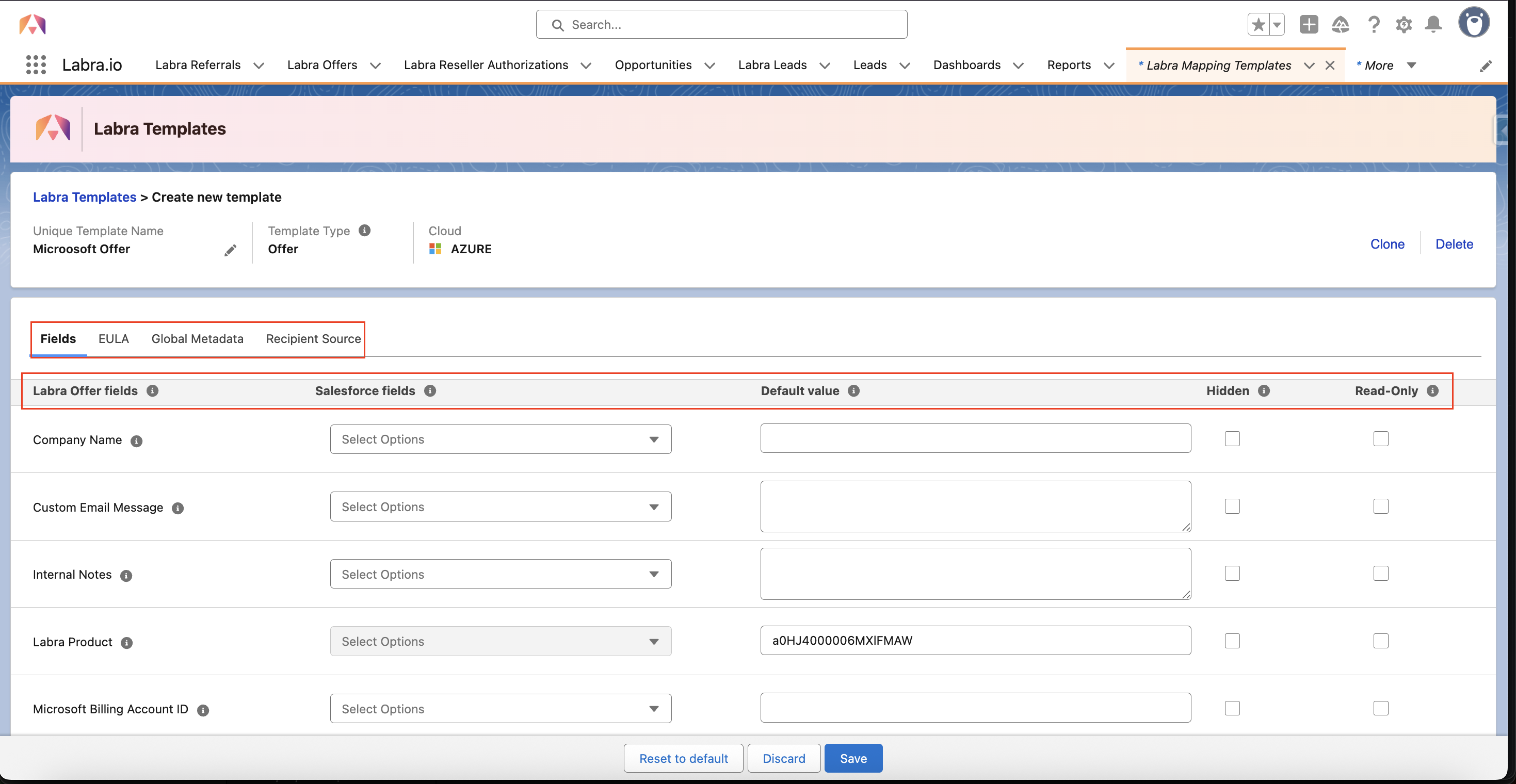
- User have four sections:
-
Fields - User can map all the fields of Microsoft Offer using Salesforce fields or Default values
- An option of Hidden and Read-only is provided for all the fields available
- User can also hide the sections of Custom metadata, Global Metadata and Stakeholder from the fields sections
-
EULA - End User License Agreement can be filled in three ways
- Default Eula - Added to all the Offers created using this template
- Mapping Based Eula - Added to all the Offer when mapped criteria is met (using this template)
- Both - can have both the above options
-
Global Metadata - Can have Key and value pairs to be added specific to the offer with value having different data types:
- Text
- Date
- Dynamic
-
Picklist
Global metadata created in one template is accessible across all creation forms and is not dependent on any specific template for the cloud.
-
Recipient Source - User can map from where the contacts should be fetched, can be from:
- Contacts
- Contact Roles
- Other objects availble of Salesforce
-
Fields - User can map all the fields of Microsoft Offer using Salesforce fields or Default values
Specific to GCP cloud: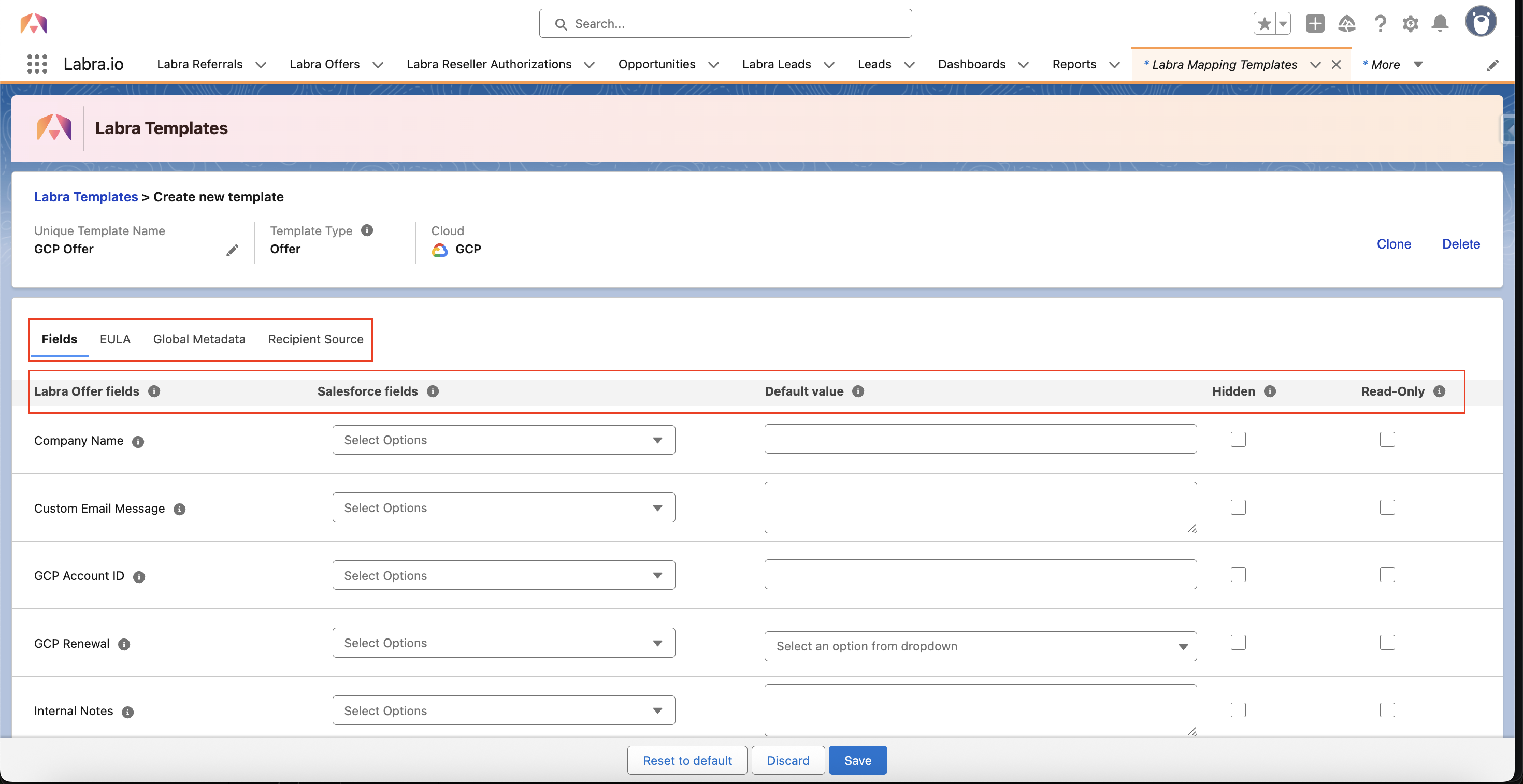
- User have four sections:
-
Fields - User can map all the fields of GCP Offer using Salesforce fields or Default values
- An option of Hidden and Read-only is provided for all the fields available
- User can also hide the sections of Custom metadata, Global Metadata and Stakeholder from the fields sections
-
EULA - End User License Agreement can be filled in three ways
- Default Eula - Added to all the Offers created using this template
- Mapping Based Eula - Added to all the Offer when mapped criteria is met (using this template)
- Both - can have both the above options
-
Global Metadata - Can have Key and value pairs to be added specific to the offer with value having different data types:
- Text
- Date
- Dynamic
-
Picklist
Global metadata created in one template is accessible across all creation forms and is not dependent on any specific template for the cloud.
-
Recipient Source - User can map from where the contacts should be fetched, can be from:
- Contacts
- Contact Roles
- Other objects availble of Salesforce
-
Fields - User can map all the fields of GCP Offer using Salesforce fields or Default values
For Reseller Authorization:
Specific to AWS cloud: 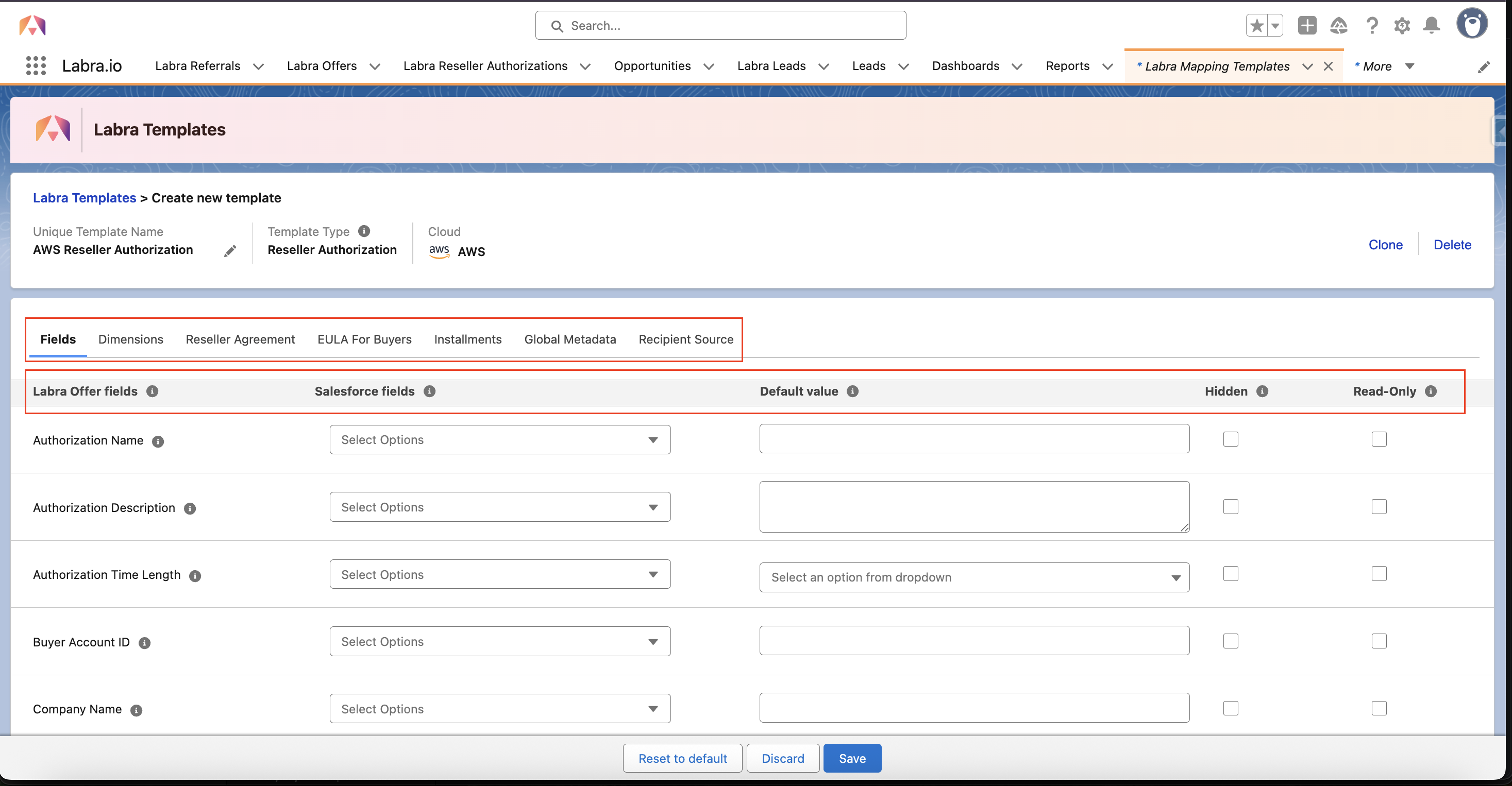
- User have seven sections:
-
Fields - User can map all the fields of AWS Resale using Salesforce fields or Default values
- A new option of Hidden and Read-only is provided for all the fields
- User can also hide the sections of Custom metadata, Global Metadata and Stakeholder from the fields sections
- Dimensions - User can map dimensions related data for the products available in the org
- Reseller Agreement - Similar to EULA for AWS we can add Reseller agreement
-
EULA For Buyers - End User License Agreement can be filled in three ways
- Default Eula - Added to all the Offers created using this template
- Mapping Based Eula - Added to all the Offer when mapped criteria is met (using this template)
- Both - can have both the above options
- Installments - User can choose an object from which installment amount and date should be picked and mapped while creating Reseller Authorization.
-
Global Metadata - Can have Key and value pairs to be added specific to the offer with value having different data types:
- Text
- Date
- Dynamic
-
Picklist
Global metadata created in one template is accessible across all creation forms and is not dependent on any specific template for the cloud.
-
Recipient Source - User can map from where the contacts should be fetched, can be from:
- Contacts
- Contact Roles
- Other objects availble of Salesforce
-
Fields - User can map all the fields of AWS Resale using Salesforce fields or Default values
Specific to Microsoft cloud: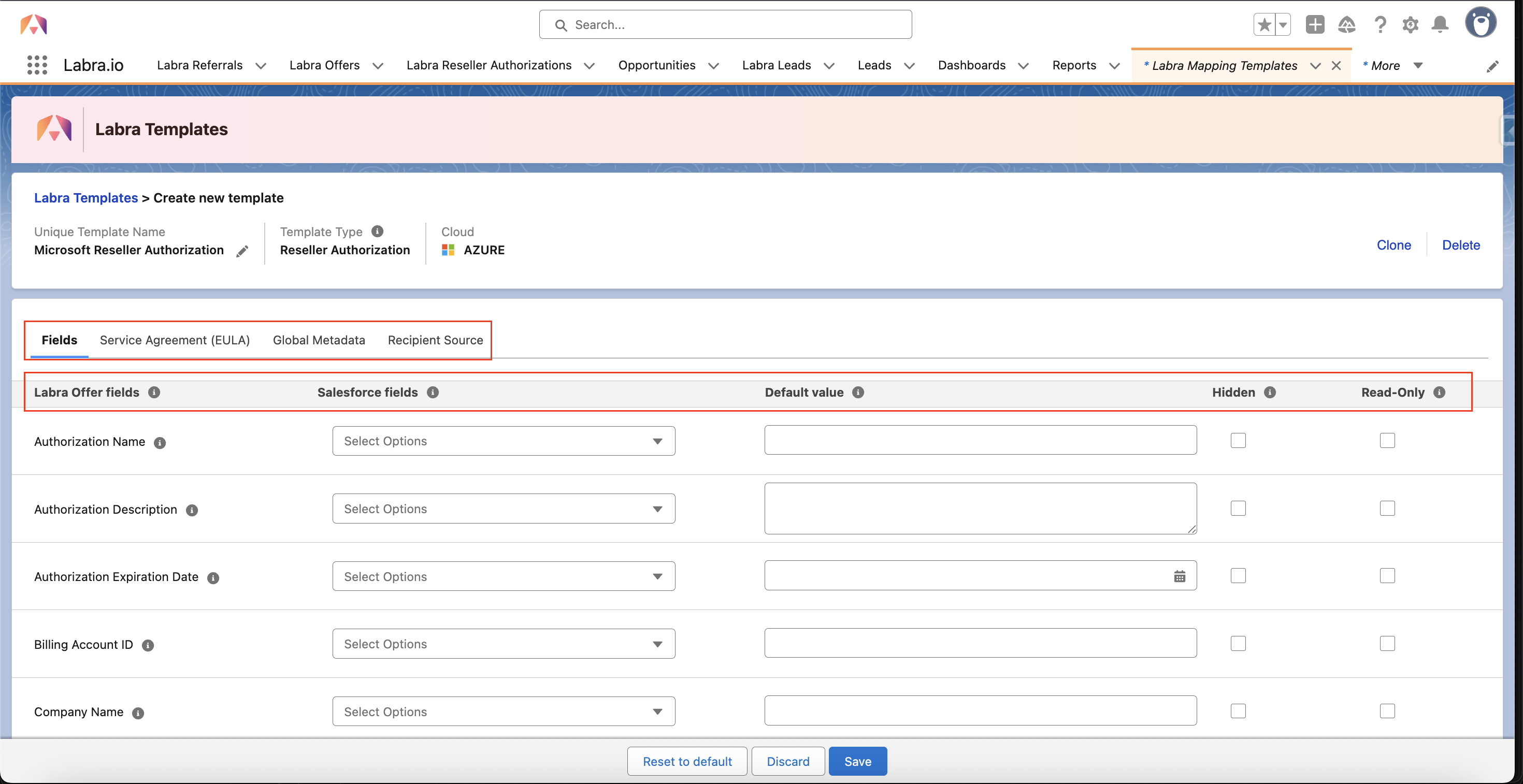
- User have four sections:
-
Fields - User can map all the fields of Microsoft using Salesforce fields or Default values
- An option of Hidden and Read-only is provided for all the fields available
- User can also hide the sections of Custom metadata, Global Metadata and Stakeholder, Buyer Notification from the fields sections
-
Service Agreement (EULA) - End User License Agreement can be filled in three ways
- Default Eula - Added to all the Offers created using this template
- Mapping Based Eula - Added to all the Offer when mapped criteria is met (using this template)
- Both - can have both the above options
-
Global Metadata - Can have Key and value pairs to be added specific to the offer with value having different data types:
- Text
- Date
- Dynamic
-
Picklist
Global metadata created in one template is accessible across all creation forms and is not dependent on any specific template for the cloud.
-
Recipient Source - User can map from where the contacts should be fetched, can be from:
- Contacts
- Contact Roles
- Other objects availble of Salesforce
-
Fields - User can map all the fields of Microsoft using Salesforce fields or Default values